Shopify App
RankPilot SEO Optimizer for Shopify
✓ Available on Shopify App Store
✦ Automatic Meta Tags
🛍 For Shopify Merchants
Open a product you haven't touched and look at what Google actually gets. The meta title is the product title repeated, the same string as the H1, and quite possibly the same string every other store selling that item is using. The meta description is empty, so Google writes its own snippet out of whatever text on the page looks relevant. That's how a shipping disclaimer ends up as your search listing.
Alt text is blank unless somebody typed it in, image by image. On a 200 product catalog that's several hundred fields nobody has ever had time for. Structured data, the JSON-LD that puts a price and a rating in the result instead of a plain blue link, isn't there at all unless your theme or an app puts it there.
None of this breaks anything. The store works fine. It just means every product turns up in search as a duplicate title and an auto-picked snippet, next to a competitor showing a price, a rating and stock status. That's less a ranking problem than a click problem. RankPilot does one job about it: read what's actually in each product's fields, across the whole catalog, and fill in what's missing.
Five screens in the order you'll meet them, from first scan to schema live on the storefront.
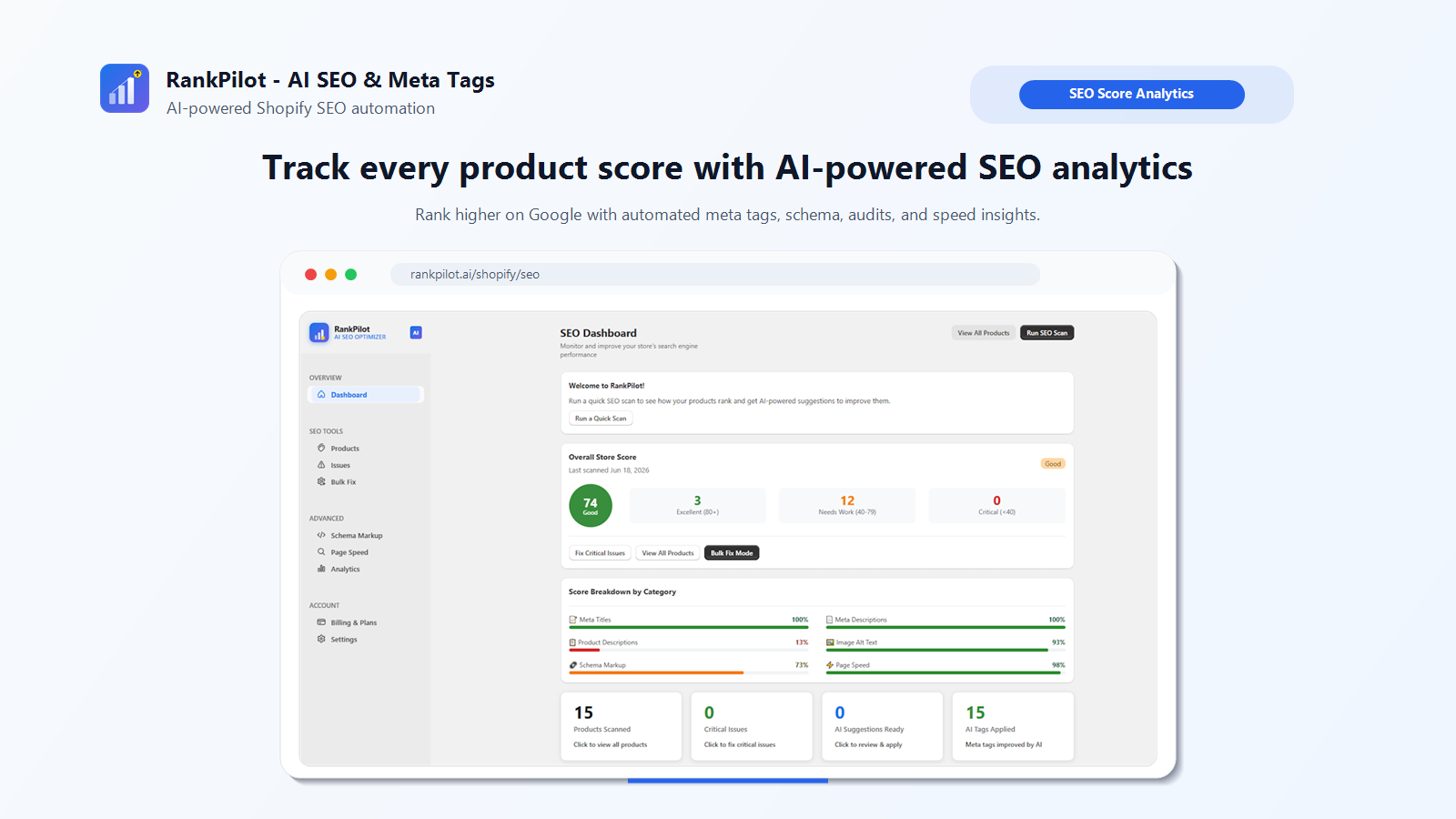
The store score sits in the ring top left, 74 in this example, with the product counts next to it split into Excellent at 80 and up, Needs Work between 40 and 79, and Critical under 40.
Underneath, the score breaks into six categories: meta titles, meta descriptions, product descriptions, image alt text, schema markup and page speed. Each gets its own percentage, and that's the part worth having. A store can sit at 100% on titles and 13% on product description content, which is exactly the sort of gap a single blended number hides.
Three buttons take you into whichever tool matches the problem: Fix Critical Issues, View All Products, Bulk Fix Mode. It's built as a starting point rather than a report you read and close.
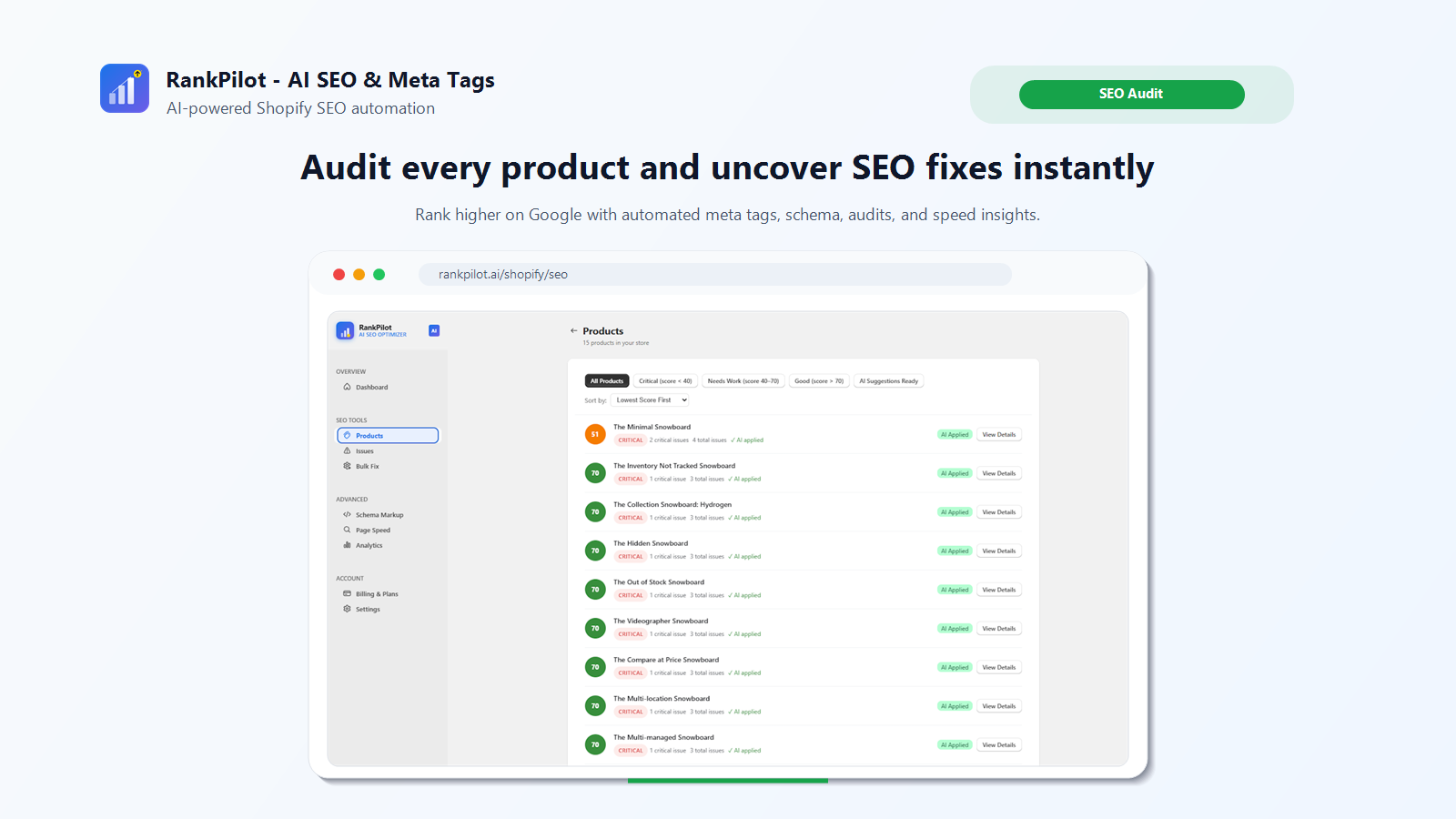
Every product in the store, one row each, sorted worst first so you aren't hunting for the problems. The tabs across the top filter down to Critical, Needs Work, Good, or just the products with suggestions waiting for review.
Each row carries a score, a severity badge, and counts for critical issues against total issues. The AI applied marker means RankPilot has already generated and applied a fix for at least one issue on that product. It doesn't mean the product is finished, which is why a row can show AI applied and 3 total issues at the same time. Reading that as done is an easy mistake to make.
View Details opens the specific fields behind the score. That's where the audit earns its keep, because a number on its own never tells you what to change.
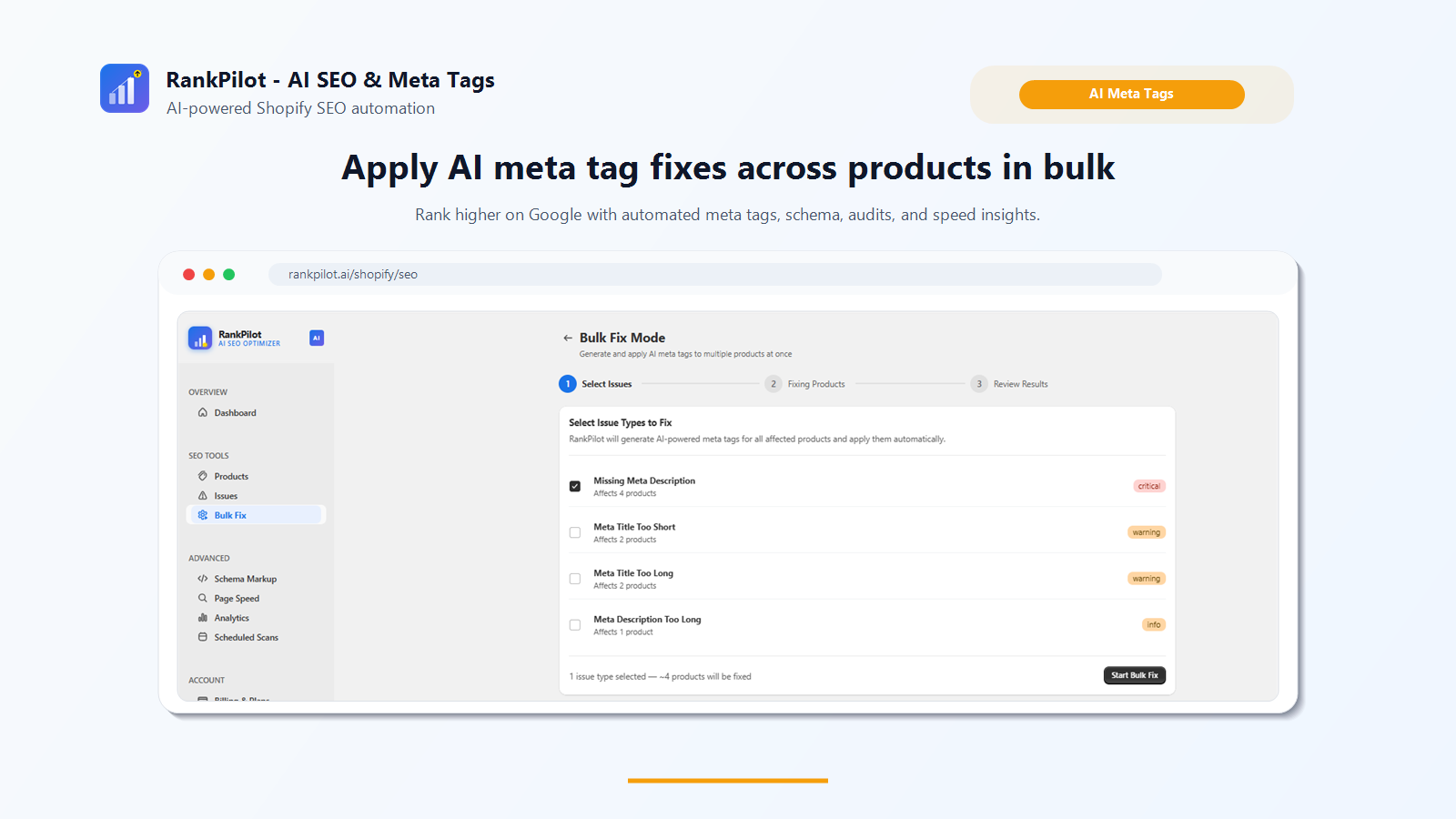
Bulk Fix handles one issue type across every product that has it, which beats opening products one by one. Step one lists the issue types currently in the catalog, tagged by severity and by how many products each one hits. Missing meta description on four products, meta title too short on two, and so on. Tick the one you want cleared.
The footer states the scope before you start, "1 issue type selected, ~4 products will be fixed", so you know what you're about to change. Step two runs it, step three shows the results.
It's deliberately one issue type per run. You can't mix short titles and missing schema into a single pass, which is slower, but it does make the outcome easier to check afterwards.
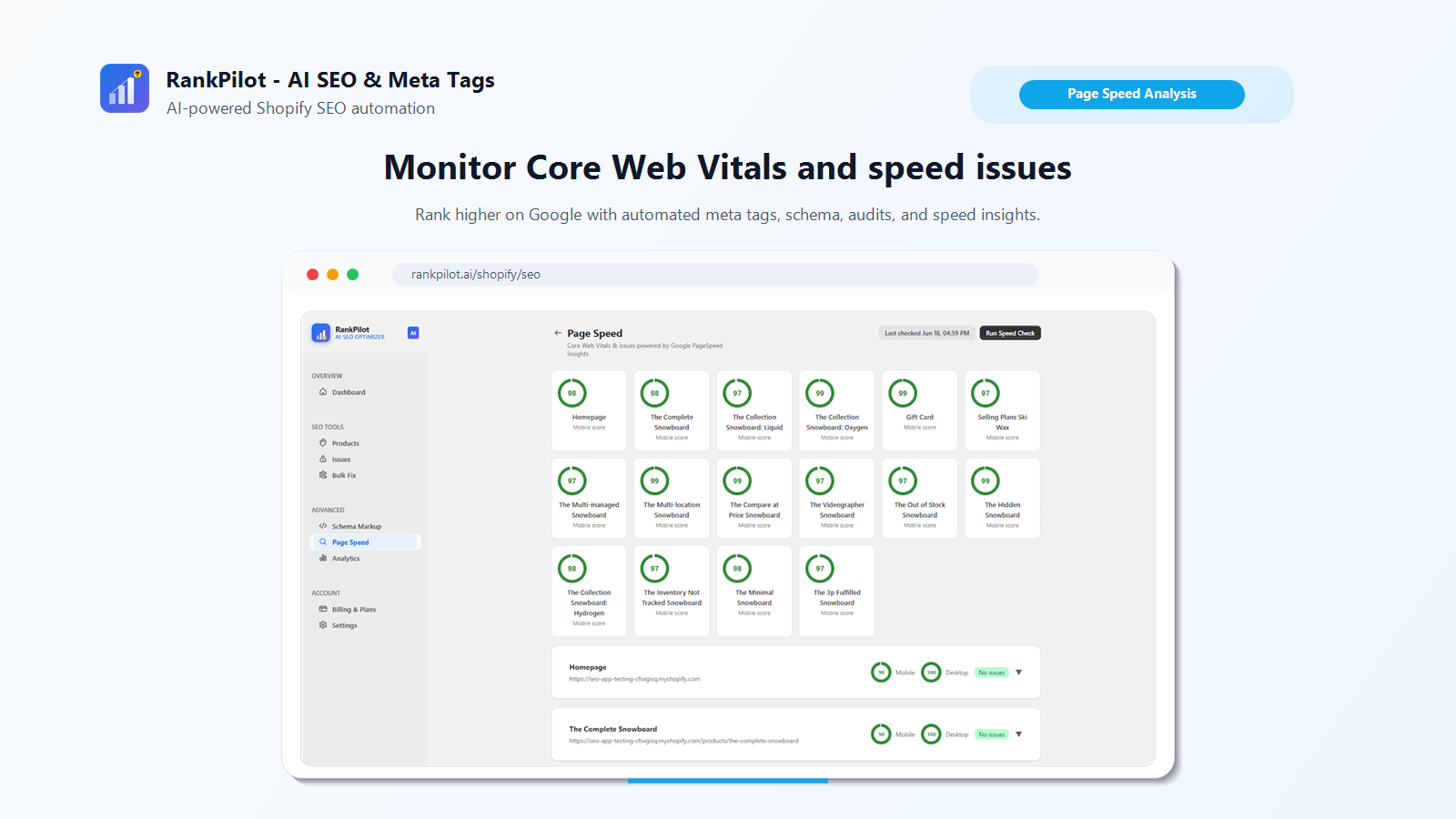
These numbers come from Google's PageSpeed Insights API rather than a score RankPilot invented, so they're the same Core Web Vitals Google uses as a ranking signal. Every product page gets a card with its mobile score, and the rows below expand to show mobile and desktop together with the live URL and an issue summary.
Each check is timestamped and re-running it is a manual click on Run Speed Check. PageSpeed Insights is rate limited at Google's end, so this isn't something that refreshes on its own every few minutes.
Worth being clear about what this tab does. It reports. It doesn't fix. A poor score here usually traces back to theme weight, other apps, or oversized images, and none of that is something a meta tag tool can reach.
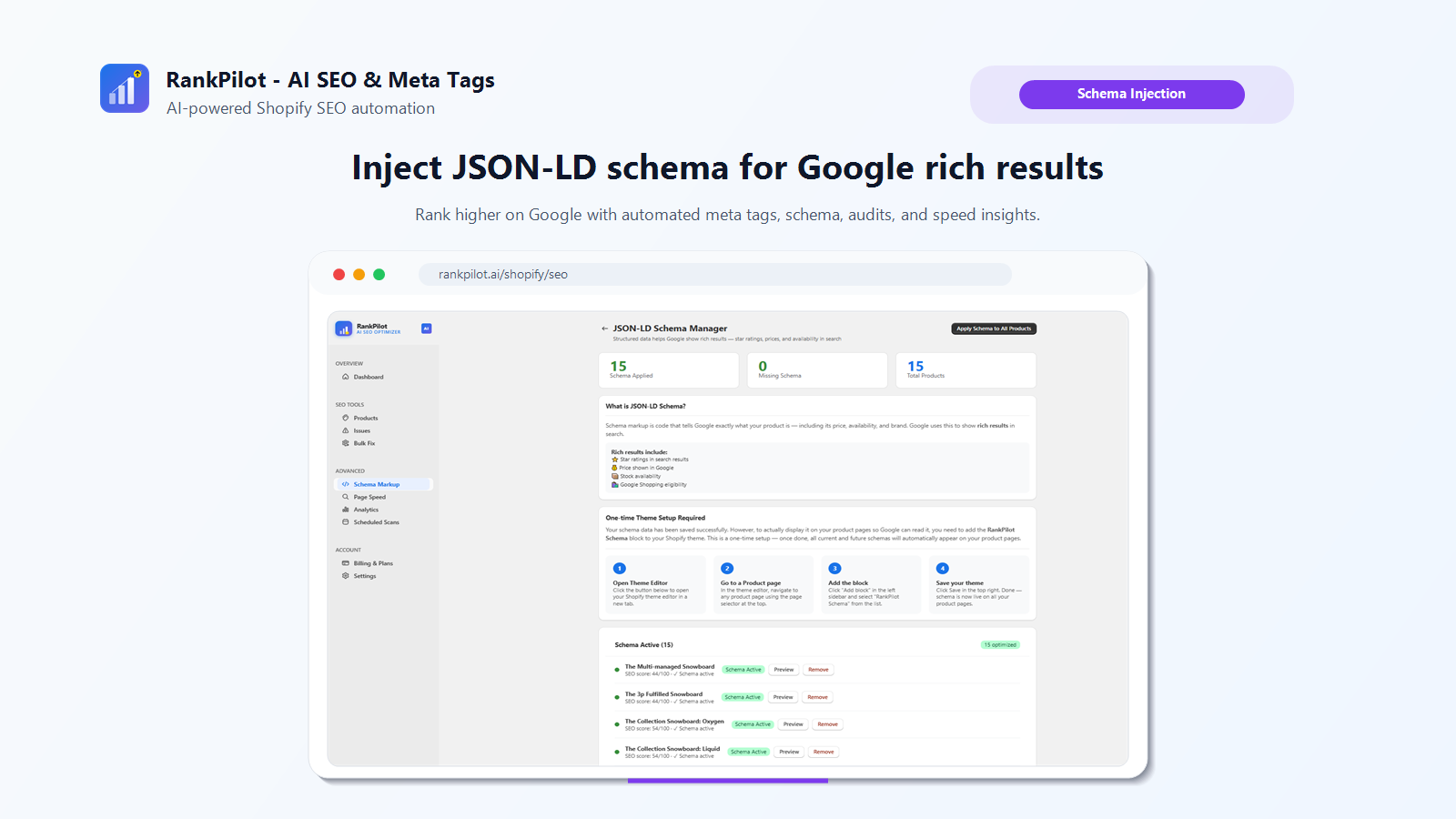
Schema markup is the JSON-LD that lets Google show a price, a rating, or in stock next to your listing instead of a plain link. Apply Schema to All Products generates it for the whole catalog in one go.
Generating it and showing it are separate jobs though, and this screen says so plainly. There's a one time setup: open the theme editor, go to a product page, add the RankPilot Schema block from the sidebar, save. It's the same app block mechanism any Shopify app uses to put something on the storefront. Skip it and your schema sits in the dashboard where Google will never see it.
The list underneath shows which products have schema running, with a Preview link to read the generated markup and a Remove button that works per product rather than all or nothing.
RankPilot reads each product's title, its existing meta title and description, the description body, and image alt text, then checks the page's Core Web Vitals through Google's PageSpeed Insights API. What it writes for is length and completeness on the meta fields, with suggestions carrying a character count and a good length flag, plus whether alt text exists, whether JSON-LD schema exists, and the speed scores. Meta titles and descriptions are written by GPT-4o mini.
It doesn't change prices, inventory, or the images themselves. For images it suggests alt text and stops there. It reports page speed problems without fixing them, since the causes usually sit in the theme, in other apps, or in image weight. Going by the feature set, it works at product and homepage level. Blog posts, collection page copy, internal linking, backlinks and actual keyword rankings all sit outside it. This is an on-page tool for a product catalog, not an SEO strategy.
The dashboard splits the score six ways: meta titles, meta descriptions, product descriptions, image alt text, schema markup and page speed, each with its own percentage. How those six are weighted into the headline number isn't published anywhere. Treat it as a relative measure for watching your own progress over time, not a figure you'd quote to a client or a boss.
Weekly auto-scanning belongs to the Growth plan. On Free and Starter, a scan happens when you click Run Scan. What the automatic version buys you is catching new products and edited fields without having to remember to. The day and time it runs aren't documented, and there's no visible setting for changing the schedule.
Schema can be switched off per product with the Remove button on the Schema Markup tab. Meta titles and descriptions are a different story. One-click apply writes over whatever is in the field, and neither the listing nor the screens show a history or an undo for it. If you might want the old values back, save them somewhere first, particularly any that were written by hand and worth keeping.
Taken straight from the Shopify App Store listing. Recurring and usage-based charges are billed every 30 days.
$0 / month
$9.99 / month
$19.99 / month
RankPilot works on the product catalog. Blog SEO, collection page copy, internal linking, backlinks, and where you actually rank for a keyword all sit outside it, and nothing on the dashboard tracks any of them. If your real problem is content or authority, this app won't move it.
The free plan stops at 50 products and 10 generations a day. A 300 product catalog would take the better part of a month to get through one pass at that rate, which is another way of saying the free plan is for trying it rather than running on. Starter covers 500 products, Growth is unlimited.
Weekly scanning is Growth only. On the cheaper plans a scan happens when somebody remembers to click the button, and people forget.
One-click apply overwrites what's already in the field with no undo. If you've paid someone to write brand specific meta copy, don't bulk apply across the catalog. Go product by product on the ones that actually need it. Beyond that, it fits a catalog where meta tags are missing or auto-generated and nobody has time to write them by hand. It fits badly when the real gap is backlinks, site structure or content.
Editing the SEO fields by hand. Shopify already gives you a meta title and description box on every product, and using them costs nothing. For 20 products, sit down for an afternoon and you're finished. Nothing beats free. The maths only changes when the catalog is big, or when it turns over fast enough that you're writing tags every week.
Your theme may already do schema. Plenty of Online Store 2.0 themes output product JSON-LD out of the box. View source on a product page and search for application/ld+json before assuming you have none. If your theme covers it, that's one of RankPilot's three tools you don't need.
The established SEO apps. Several have longer track records and far more reviews than RankPilot has. Compare them directly, especially if you want technical SEO across the whole site rather than the product catalog alone.
And if you only want to check the odd page now and then, ArvoPeak's free Page SEO Analyzer extension scores much the same categories in the browser without installing anything on the store. Handy for looking at a competitor's page. It won't do catalog wide fixes.
Meta titles and descriptions you applied are written into Shopify's own SEO fields on the product, so they stay. At that point they are ordinary product data, the same as if you had typed them yourself. Schema is different. It runs through the RankPilot Schema theme block, and Shopify disables an app's blocks when the app is removed, so structured data stops appearing on the storefront.
The scanning, auditing and generating all happen in RankPilot's dashboard against your store data. None of it loads for shoppers. The exception is the schema block, which puts a small JSON-LD script tag on each product page. That is inert markup for search engines to read, not code the browser runs, so it should not show up in your load times.
The listing does not say. Ask the developer before you build reporting that depends on it.
Weekly scanning comes with the Growth plan. The listing does not give a day or a time, and there is no visible control for changing it.
Yes, as far as anything published shows. One-click apply replaces what is in the field, hand written or not, and there is no before and after view. Read the suggestion first if the current title matters to you.
The listing names GPT-4o mini and does not mention the model changing between plans. The Free plan's limit is on how many you can generate per day, which is 10, not on what comes back.
Install RankPilot and run a free scan on your own catalog. The audit shows which products are missing tags, alt text or schema before you pay for anything.
Free plan available · No credit card required · Cancel anytime